CRM Automation Agency in India: Why Your CRM Is Failing You — and How to Fix It in 5 Days
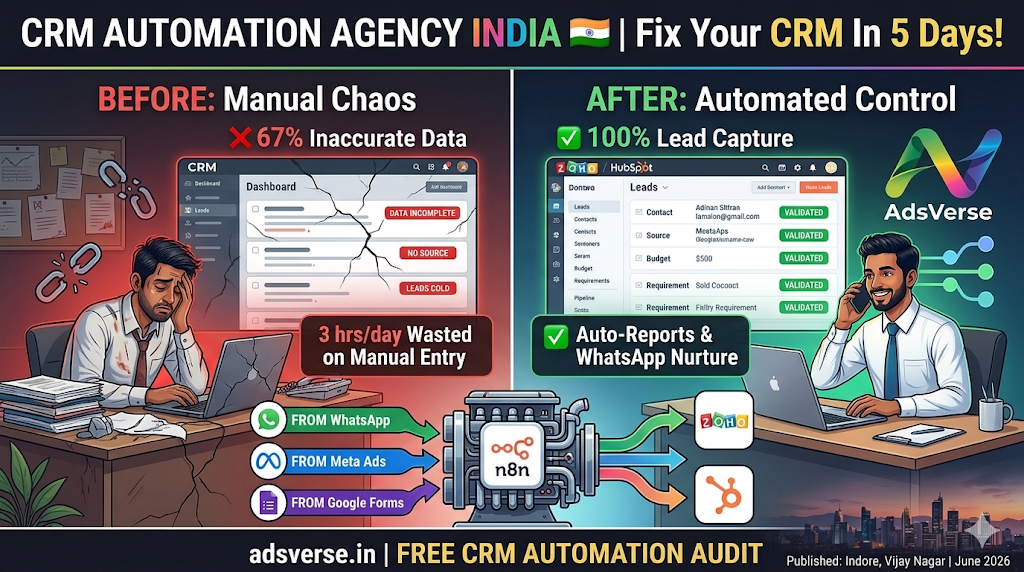
Aapne CRM kharida. Team ko training di. Pehle 2 hafte sab log enthusiastic the — har lead enter ho rahi thi, stages update ho rahi thi. Phir kya hua? Busy season aaya, entries slow ho gayi. Staff ne shortcuts lene shuru kiye. Ab CRM mein jo data hai woh 40% incomplete hai, 30% outdated hai, aur reporting pe trust karna mushkil ho gaya hai.
Yeh India mein CRM failure ka most common pattern hai — aur yeh CRM ka problem nahi hai. Yeh manual data entry ka problem hai. Jab aap insano ko boring, repetitive kaam karne pe depend karte ho — inconsistency guaranteed hai. Solution sirf ek hai: automate the data flow completely.
Yeh guide specifically CRM automation ke baare mein hai — kya kaam nahi kar raha, kaise fix karo, aur ek properly automated CRM kaisa dikhta hai in practice.
1. The 6 Signs Your CRM Needs Automation
CRM mein sirf naam aur number hai — koi source, koi requirement, koi budget, koi stage. Reports based on this data are meaningless. Sales team doesn't know who to prioritize.
Lead aaya 10 AM pe — CRM mein 4 PM pe entered. Those 6 hours? Lead already talked to 2 competitors. In India's WhatsApp-first market, speed is everything.
Alag log "Interested" aur "Qualified" ko alag define karte hain. Pipeline forecast unreliable hai. Management decisions based on inaccurate stage data — costly mistakes.
Weekend WhatsApp leads, after-hours calls, Meta ad form submissions — agar koi manually enter na kare, yeh leads CRM mein kabhi reach nahi karti. Revenue disappears silently.
Weekly sales report banane ke liye someone manually pulls data, formats it, sends it. By the time report is ready — decisions could have been made 3 days ago.
Team ne quietly stop kiya CRM update karna — too much friction, too many steps. Ab aap Zoho ya HubSpot ka monthly subscription pay kar rahe ho for a tool your team avoids.
Agar inme se 2+ aapke business mein hain — CRM automation immediate priority honi chahiye. Yeh problems time ke saath worse hote hain, better nahi — kyunki jaise business grow karta hai, manual entry ki mismatch aur bhi zyada prominent ho jaati hai.
2. What a Properly Automated CRM Looks Like
3. How AdsVerse Automates Your CRM — The Complete Flow
4. CRM Automation for Different Indian Business Types
Har business ka CRM automation slightly alag hota hai — depending on sales cycle length, lead volume, aur conversion process. Yeh real configurations hain jo AdsVerse ne deploy kiye hain:
🎓 Coaching Institute — High Volume, Short Cycle
150+ monthly WhatsApp inquiries — bot qualifies batch/course interest, fee range, preferred timing. CRM auto-populated with all data. Hot leads (ready to enroll) → counsellor WhatsApp alert. Warm leads → 5-day WhatsApp nurture sequence with results, faculty info, demo class invite. CRM stage auto-updates when demo attended. Enrollment → payment → onboarding sequence fires. Total manual CRM work: near zero.
🏠 Real Estate — Low Volume, Long Cycle
30–40 monthly leads, 4–8 week sales cycle. Every lead fully qualified: budget, area preference, property type, timeline. CRM populated with all qualification data. Long nurture sequence: Day 3 (similar properties), Day 7 (area guide), Day 14 (market update), Day 21 (site visit invite). Stale deal detection: if no activity for 7 days → manager alert. Site visit scheduled → calendar blocked → reminder auto-sent. Deal won → client onboarding → referral request at Day 30.
🏥 Clinic — Appointment-Based, Repeat Visits
Patient inquiry → appointment booked via WhatsApp bot → CRM contact created with medical interest tagged. Appointment reminder at 24hr and 2hr. Post-visit: review request. 3-month re-engagement: "Checkup due?" Specialist referral: agar patient has specific condition → relevant specialist info auto-sent. Annual health camp invite → all past patients automatically notified.
5. Which CRM + Which Automation Setup
| Business Size | Recommended CRM | n8n Workflows | Monthly Cost |
|---|---|---|---|
| Solo / 1–2 person Under 30 leads/month |
Google Sheets (free) or Zoho Free | Lead capture + WhatsApp alert + daily summary | ₹4,500/month |
| Small team / 3–8 people 30–100 leads/month |
Zoho CRM (₹800–₹1,400/user/month) | Full lead automation + pipeline stages + follow-up sequences | ₹7,000/month |
| Mid-size / 8–20 people 100–300 leads/month |
HubSpot or Leadsquared | Multi-source capture + scoring + nurture + reporting dashboard | ₹12,000/month |
| Scale / 20+ people 300+ leads/month |
Leadsquared / Salesforce | Full stack: capture + qualify + nurture + pipeline + retention + BI reports | ₹18,000+/month |
6. The 5-Day AdsVerse CRM Automation Deployment
-
Day 1 — CRM Audit + Source Mapping
Aapka current CRM review karte hain — kaunse fields hain, kaunse missing hain, kaunse sources currently connected hain, kaunsa data regularly updated hai vs neglected. Saare lead sources identify karte hain: WhatsApp, ads, website, phone. Automation blueprint finalize hota hai.
-
Day 2 — n8n Infrastructure + Source Connections
n8n Indian server pe setup hota hai. Har lead source connect hota hai: WhatsApp API webhook, Meta Ads webhook, Google Ads webhook, website form webhook. Test lead bheja jaata hai each source se — verify hota hai ki CRM mein correctly reach kar raha hai.
-
Day 3 — Field Mapping + Lead Scoring
Har data field aapke CRM ke exact field se map hota hai — source-specific. Lead scoring logic configure hoti hai: kaunsa combination of answers = hot vs warm vs cold. Stage assignment logic define hota hai — consistent across all team members, automatic.
-
Day 4 — Pipeline Automation + Follow-up Workflows
Stage-based triggers build hote hain: stage change → WhatsApp trigger. Stale deal detection setup hota hai. Follow-up sequences configure hote hain for warm leads. Daily report workflow build hota hai — morning summary to owner's WhatsApp.
-
Day 5 — Testing + Go Live
30+ end-to-end test scenarios run kiye jaate hain — every source, every lead type, every edge case. Error handling verified. Sales team briefed on what changes for them (hint: mostly they just get better data and fewer manual tasks). System goes live. First 14 days monitoring included.
"CRM 6 mahine se waste pad raha tha — koi update nahi karta tha. AdsVerse ne automation lagaya — ab khud update hota hai. Team ko CRM se pyaar ho gaya."— Director, Coaching Chain, Indore · AdsVerse Client, 2025
7. What Changes for Your Sales Team
Ek common concern: "Agar CRM automatically update ho raha hai toh kya sales team ko kuch nahi karna padega?" Haan — aur yeh ek good thing hai. Yeh changes aati hain:
- Less data entry: Team manually kuch bhi type nahi karti — data already CRM mein hai. Unka kaam sirf deals close karna aur notes add karna hai jo genuinely human input maangta hai.
- Better lead context: Jab sales person kisi lead ko call kare — CRM mein pura history hai: kahan se aaya, kya qualify hua, kaun se messages respond kiye, kab last touchpoint tha. Context-aware conversations convert better.
- Prioritized workload: CRM automatically hot leads top pe dikhata hai. Team knows exactly who to call first without any manual sorting or guessing.
- Automated reminders: Follow-up yaad dilane ke liye manager nahi chahiye — CRM aur n8n mila ke right time pe WhatsApp notification deta hai: "Aaj [Name] ko follow up karo."
- Accurate commission tracking: CRM mein data accurate hai — deals properly attributed hote hain — commission disputes eliminate hote hain.
Fix Your CRM in 5 Days — Permanently
Free CRM audit — hum dekheinge aapka current setup aur batayenge exactly kahan data leak ho raha hai aur kaun sa automation highest impact dega. Koi commitment nahi.
Get Your Free CRM Automation Audit →Join the Conversation
Have insights or questions about this post? We'd love to hear from you. Connect with our team directly or share your thoughts via WhatsApp.
AdsVerse · Digital Excellence 2026